
AppGovern separates two things: what a person can do inside the AppGovern console (their role) and what they are accountable for in the governance process (owner, manager, reviewer). This article covers both.
Console roles
Every user who signs in to AppGovern has one of three roles:
| Role | Who it is for | What they can do |
|---|---|---|
| Admin | Security, IT, and governance staff who run AppGovern | Full access: connect IdPs, manage apps and owners, configure settings, run campaigns, manage users, edit mail templates |
| Manager | People leaders and app owners who need to act on items assigned to them | View and act on their own apps, their team's certifications, and approvals routed to them; permissions for each module are set by the admin |
| User | Everyone else | See their own access, respond to self-certification requests, submit access requests, and report apps |
Roles are set when a local user is created (User Management > Local Users > Create New User) and can be changed later from the same page. Users synced from your identity provider start as User and can be promoted by an admin.
Module permissions
Admins can fine-tune what each role can do per module under Settings > Permission Management. Pick a role, then check View, Edit, Insert, or Delete for each of:
- App Directory
- App Requests
- User Management
- Integration
- Notification (view only)
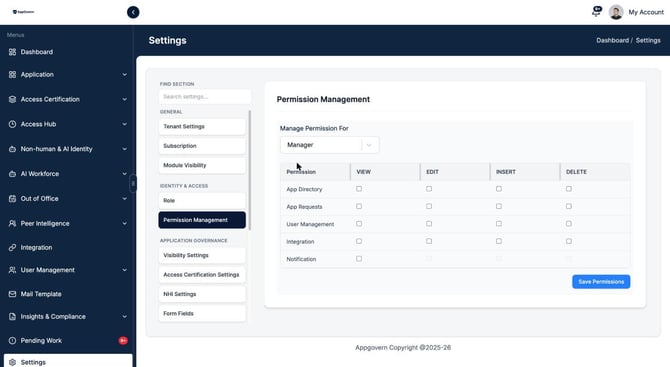
Click Save Permissions to apply. Changes take effect on the user's next page load.
A common setup is to give Managers View on App Directory and App Requests so they can see context for approvals, but no Edit, Insert, or Delete.
Governance responsibilities
Separately from console roles, people carry responsibilities tied to specific apps and users. These are not set in Permission Management; they come from ownership assignments and the org chart.
| Responsibility | How it is assigned | What they are asked to do |
|---|---|---|
| Business Owner | Manage owners on an app | Certify the app each cycle, approve access requests, decide renew or retire |
| Technical Owner | Manage owners on an app | Keep the connector healthy, maintain configuration |
| Security Owner | Manage owners on an app | Review flagged access, respond to risk findings |
| Secondary owner | Manage owners on an app | Act for the primary owner when they are out of office |
| Manager | Synced from the IdP or set on the user record | Certify their direct (and optionally nested) reports' access each cycle, approve access requests from their team |
| End user | Everyone with an account | Self-certify their own access when asked, request access, report missing apps |
A person can hold several of these at once. A Manager-role user who is also a Business Owner for three apps sees both their team certifications and their app certifications.
Account types
User Management also distinguishes account types, which are separate from roles:
- IDP User: synced from Okta, Entra, Google Workspace, JumpCloud, or Auth0. Attributes like manager and department come from the IdP.
- Local User: created in AppGovern directly. Useful for admins, contractors, or test accounts not in your IdP.
- Bot Account: a non-human identity that AppGovern detected or that you registered. Governed under Non-human & AI Identity, not given a console role.
Where to look
- User Management > All Users: every account with its type, source, manager, apps assigned, and apps owned.
- User Management > Local Users: create and edit local accounts and their roles.
- User Management > IDP Users: accounts synced from the identity provider.
- User Management > App Users: who has access to which app.
- Settings > Role and Settings > Permission Management: role definitions and per-module permissions.
Common questions
Can I create a custom role? The three roles are fixed, but their module permissions are adjustable under Permission Management.
Does an app owner need the Manager role? Not necessarily. Owner tasks arrive by email and in the My Owned Apps view, which the User role can reach. Give the Manager role when the person needs to browse App Directory or approve requests in the console.
Who can change permissions? Only Admins.