
Every app names its user fields differently. One calls it "email", another "mail", another "primaryEmail". Mapping tells AppGovern which field is which, so every app's users look the same once they arrive. You map the fields once, and each sync reads them the same way.
Map fields for a connector
- In the connection wizard, finish the Connect step and click Test Connection & Detect Fields. AppGovern calls the app and lists the fields it returned.
- Click Next to open Mapping.
- Match the app's fields to AppGovern's user fields. At minimum, map email. Map name, username, role, status, and last login too if the app returns them.
- Check the preview of incoming data. If names or roles look wrong, fix the mapping before you save.
- Continue to Segments and save.
What you can map depends on what the app's API returns. Some apps give you last login and roles, and some do not.
Import users from a CSV file
Use this when the app has no API.
- Go to Application > App Connections, find the app, and click Connect.
- Set Connector Type to No Connection (Manual Import) and click Next.
- Click Download CSV template and fill it in.
- Upload the file under Choose CSV file.
- Continue through Mapping and Segments.
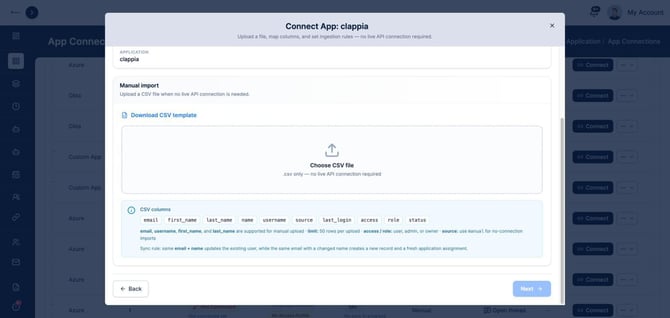
CSV columns
| Column | What to put in it |
|---|---|
| The person's email address | |
| first_name, last_name, name | Their name |
| username | Their username in the app |
| source | Use manual for a manual import |
| last_login | When they last signed in, if you know |
| access | user, admin, or owner |
| role | user, admin, or owner |
| status | Whether the account is active |
Rules to know
- Each upload holds up to 50 rows. Split larger lists into several files.
- A row with the same email and name as an existing user updates that user.
- A row with the same email but a different name creates a new record and a new app assignment. Keep names consistent between uploads.
Keep imported apps current
A manual import is a snapshot. Upload a fresh file whenever the app's users change, or at least before each access certification.