
AI agents get certified the same way people do. The agent's owner reviews what the agent can reach and confirms it is still needed and still correct. This gives you a named person, a date, and a record for every agent in an audit.
Who certifies an agent
By default, the request goes to the agent owner (the business owner on the agent's Ownership tab). You can also send it to a custom user who certifies on the owner's behalf for a limited time. The custom user cannot be the agent owner.
An agent with no owner cannot be certified in a useful way. Assign a business owner first. See Adding an Agent and Assigning Owners.
The AI Agent Certification page
Go to Access Certification > AI Agent Certification. The page has four tabs: AI Agents, MCP Servers, Flags, and Change Requests.
On the AI Agents tab, each row shows:
- The agent, its owner and security owner, and its risk level
- How many applications it reaches
- The most recent and next certification dates
- Status (for example, Not started), whether it is flagged, and guidance on what to do next
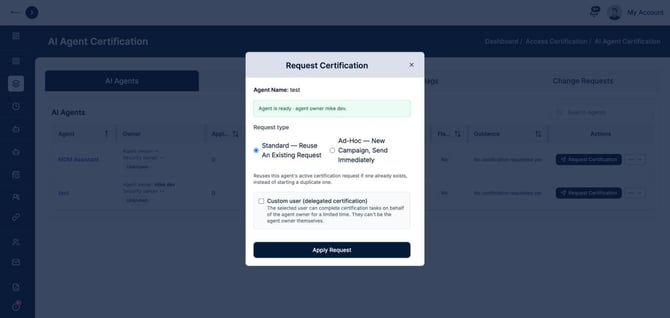
Request a certification
- Find the agent and click Request Certification. You can also start one from the agent's own Certification tab.
- Check the readiness note. It confirms the agent has an owner to send the request to.
- Choose the Request type:
- Standard: reuses the agent's active certification request if one exists, so you do not create duplicates.
- Ad-Hoc: starts a new campaign and sends it right away.
- To delegate, check Custom user (delegated certification) and choose the person.
- Click Apply Request.
The owner receives the request and reviews the agent's access. Their decision is recorded on the agent and in the Certification Report.
Start certifications automatically
A policy can start a certification on its own when it finds a violation, so the owner is asked to review the agent as soon as something is wrong. See AI Policies, Risk Scoring, and Violations.
Tracking progress
- The Certification panel on the AI Workforce Governance Dashboard counts agents that are Certified, Pending, Not Certified, and Flagged.
- The Governance tab lists agents Requiring Certification, Never Certified, and with Expired Certifications.
- The Certification Report under AI Workforce Reports gives the full record for auditors.
Tips
- Certify high-risk and production-data agents first.
- If an owner is out, delegate with a custom user rather than leaving the request to expire.
- When an agent's access changes (a new MCP server, a new application), request a fresh certification rather than waiting for the next cycle.