
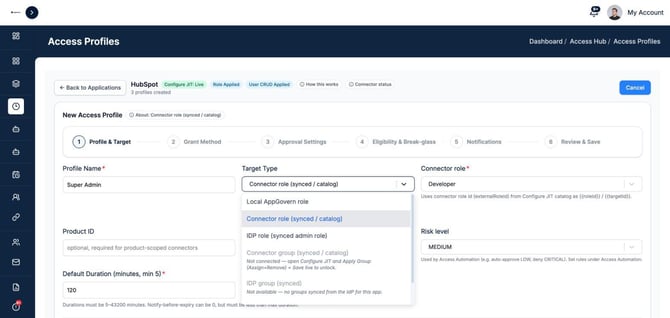
The target type decides what an access profile actually grants. You can grant access through your identity provider, straight into the application, or only inside AppGovern. You choose the target type in the first step of creating a profile.
The target types
| Target type | What it grants | When to use it |
|---|---|---|
| Local AppGovern role | A role recorded in AppGovern only | Tracking and approving access to an app with no connection, where someone grants access by hand |
| Connector role | A role inside the app, from the app connection's role list | Apps connected to AppGovern where access is controlled by roles |
| Connector group | A group or team inside the app | Apps where access is controlled by group membership |
| Permission set | A permission set inside the app | Apps that control access with permission sets |
| IdP group | A group in your identity provider | Apps that take their access from Okta, Entra, or Google group membership |
| IdP role | An admin role synced from your identity provider | Admin roles managed in the identity provider |
How to choose
Grant in the app when you can. Connector roles, groups, and permission sets act directly on the application. This covers access that never touches your identity provider, including accounts that sit outside single sign-on.
Use an IdP group when the app trusts your IdP. If adding someone to an Okta or Entra group is how they get admin in the app, target that group. The IdP group option only appears when groups have been synced from the identity provider for that app.
Use a local AppGovern role when there is no connection. You still get eligibility rules, approvals, time limits, and an audit trail. Pair it with a manual grant method so an operator does the work from a ticket.
Unlocking more target types
On an application's profile page, the badges next to the app name show what its connection supports, for example Role Applied or User CRUD Applied. Connector role is available once roles are set up. Connector group and Permission set appear grayed out until they are set up for that app. Use Connector status on the same page to see where the connection stands, and How this works for a short explanation.
If the target type you need is grayed out, finish setting up the app connection first. See Connecting an Application.
Good to know
- Access Hub only grants entitlements a person does not already have. If they already hold the role, nothing changes.
- When access expires, AppGovern removes the role, group, or permission set it added. Whether the account itself is deleted depends on the profile's revoke setting. See Creating an Access Profile.