
Access Hub settings set tenant-wide defaults for just-in-time access: how access is granted, who approves it, how it is removed, and who is told. New access profiles start from these defaults, and each profile can change them.
Go to Access Hub > Settings. The page has four sections. Click Save Settings after making changes.
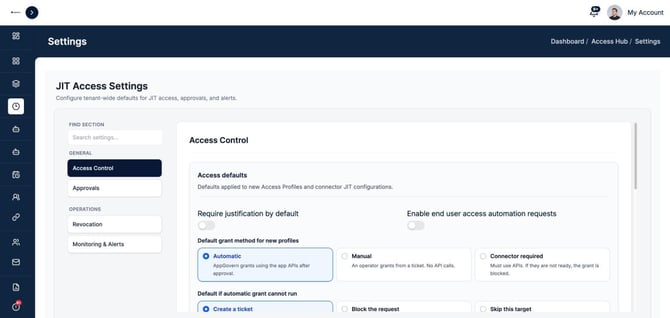
Access Control
| Setting | What it does |
|---|---|
| Require justification by default | New profiles ask requesters to say why they need access |
| Enable end user access automation requests | Lets end users submit access automation requests |
| Default grant method for new profiles | Automatic (AppGovern grants through the app's API after approval), Manual (an operator grants from a ticket), or Connector required (the API must be used, or the grant is blocked) |
| Default if automatic grant cannot run | Create a ticket, block the request, or skip that target |
| Break-glass (emergency access) | Turns on emergency access for all users or specific users. See the Break-Glass Access article. |
| Default max duration by risk | The longest access can last, in minutes, for Low, Medium, High, and Critical profiles |
Approvals
| Setting | What it does |
|---|---|
| Enable approval workflow | Requests need approval before access is granted |
| Multi-level approval | Allows approval chains with more than one approver |
| Default approver | Who approves when a profile does not say otherwise, for example the requester's manager |
| Default approval SLA by risk | How quickly approvers should act, in minutes, for each risk level |
Revocation
| Setting | What it does |
|---|---|
| Auto revoke on expiry | Removes access when the time is up |
| Retry if revoke fails | Tries again if the first removal attempt fails |
| Manual tickets in Jira | Opens a Jira ticket when an operator has to act by hand |
| Manual tickets in ServiceNow | Opens a ServiceNow ticket when an operator has to act by hand |
Tickets include the requester, the target, the approvers, whether break glass was used, any automation rule that matched, and the steps to take. Turn on both Jira and ServiceNow to create a ticket in each.
Monitoring & Alerts
| Setting | What it does |
|---|---|
| Notify on access grant | Sends a notification when access is granted |
| Notify on revocation | Sends a notification when access is removed |
| Alert on high risk access | Sends an alert when high-risk access is granted |
| Security notification email | Where security alerts go |
| Notification channels | In-app, email, and Slack or Microsoft Teams |
Slack and Microsoft Teams use the webhooks set under Tenant Settings > Notification Channels.
Recommended starting point
- Turn on Auto revoke on expiry and Retry if revoke fails.
- Require justification by default.
- Keep maximum durations short for High and Critical: a few hours, not days.
- Turn on Alert on high risk access and send it to a shared security mailbox.
- Turn on break glass only for a small named group.